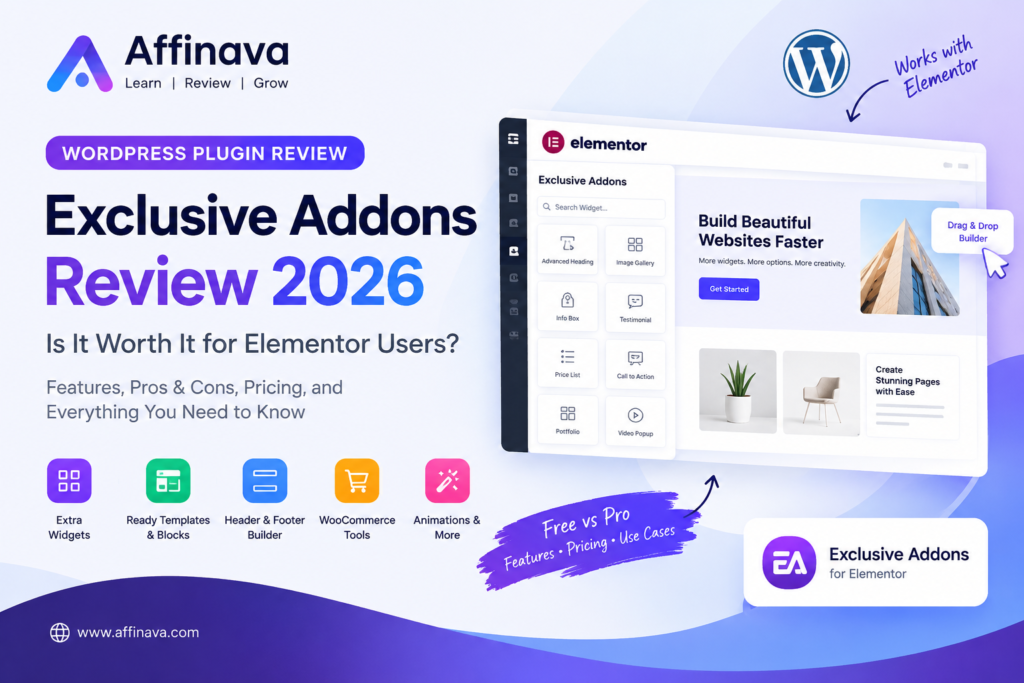
Exclusive Addons Review 2026
Building a professional WordPress website does not always require hiring a developer. With Elementor, users can design pages visually, but sometimes the available widgets and design options are not enough to achieve the desired result.
This is where Elementor Addons come in. They extend the page builder with additional design elements, layout options, animations, and other useful tools.
Exclusive Addons is one such plugin. It offers a collection of Elementor widgets, templates, extensions, and WooCommerce-related features designed to give website owners more flexibility.
But does having more widgets automatically make a plugin a worthwhile investment? Not necessarily.
In this Exclusive Addons review, we will examine its main features, potential benefits, limitations, pricing considerations, and the types of users who may find it useful.
What Are Exclusive Addons?
Exclusive Addons is a WordPress plugin that extends Elementor with additional widgets and design tools.
Rather than relying entirely on Elementor’s standard elements, users can access additional components for building layouts, displaying content, designing navigation menus, and creating more customised pages.
The plugin offers both free and premium functionality. Its available tools can vary depending on the version and license you choose.
Exclusive Addons may be worth considering if you regularly build pages with Elementor and want more design options without creating every element from scratch.
Exclusive Addons Review: Key Features
1. Additional Elementor Widgets
The plugin provides extra elements for different website design tasks. Depending on the available version, these may include content grids, image displays, interactive elements, and other page components.
These widgets can be useful when Elementor’s built-in options do not provide the layout you need.
However, more widgets are not always better. Before installing an add-on, consider whether its features solve actual problems on your website.
2. Ready-Made Templates and Blocks
Exclusive Addons offers ready-made templates and section blocks that can help users create pages more efficiently.
Instead of designing every section from the beginning, you can start with an existing layout and customise it to suit your website.
This can be particularly helpful for freelancers, bloggers, and small businesses that need to create landing pages or promotional sections without spending too much time on design.
Keep in mind that templates may still require adjustments to match your branding, typography, spacing, and mobile layout.
3. Header and Footer Design
Header and footer layouts play an important role in website navigation and branding.
Exclusive Addons has offered header and footer building tools that allow Elementor users to create customised layouts instead of relying entirely on their theme’s default design.
Before choosing a licence, check which header and footer features are included in the current free and premium versions.
Also, make sure the features you need are compatible with your existing theme and other installed plugins.

4. Mega Menu and Navigation Options
Websites with many categories or pages sometimes need more advanced navigation than a simple menu can provide.
The mega menu feature is listed under the Exclusive Addons features. This can be useful for business web sites, online stores and larger content websites that need to organise multiple links.
However, a mega menu is not necessary for every website. A simple navigation menu may be more effective for a small blog or review website.

5. WooCommerce Design Tools
For online store owners, Exclusive Addons has offered WooCommerce-related widgets and builder features.
Depending on the version and licence, these may help customise product displays, product categories, cart layouts, and checkout-related pages.
These options can be useful if you want greater control over the appearance of your store.
Before purchasing, verify the exact WooCommerce features included in the current plan. Do not assume that every premium feature is available in the free version.
6. Animation and Interactive Effects
Exclusive Addons has also offered animation and visual effects, including options such as Lottie animations, floating effects, parallax, and other interactive elements.
These can help make selected sections more visually engaging.
However, animations should serve a purpose rather than simply decorate every page. Excessive effects may distract visitors and can introduce additional performance considerations.
Exclusive Addons Review: Is it Easy to Use?
Exclusive Addons is designed to work with Elementor’s visual editing environment. Users who are already familiar with Elementor may find the general workflow easier to understand than learning an entirely different page builder.
Nevertheless, the actual learning experience depends on the widgets you use, your existing setup, and the complexity of your design.
Beginners should start with a small number of widgets and learn how they work before adding more advanced elements.
If you are new to Elementor, you may also want to explore its built-in features first. You might not need an additional plugin for every design task.
Exclusive Addons Review: Free vs. Pro
Exclusive Addons has a free version and a premium version. The exact features and license limits should be checked on the official website before making a purchase.
| Area | Free version | Premium version |
| Additional widgets | Selected widgets | More advanced options |
| Design elements | Basic selection | Broader selection |
| Templates and extensions | Limited selection | Additional options, depending on the plan |
| WooCommerce tools | Check current availability. | Check the specific licence. |
| Best suited for | Basic design needs | Users requiring more advanced functionality |
This is a general comparison, not a complete feature-by-feature license list. Features can change, so check the current plan details before buying.
Official website: https://exclusiveaddons.com/
Exclusive Addons Review: Potential Advantages
Based on its published feature set, Exclusive Addons offers several potential benefits.
- More design flexibility: Additional widgets can expand Elementor’s design options.
- Faster page creation: Ready-made blocks and templates can reduce repetitive work.
- Useful navigation tools: Mega menu and header/footer features may help with more customised layouts.
- E-commerce options: WooCommerce-related tools may benefit store owners who want more control over page design.
- Free version available: Users can investigate the plugin’s free offering before committing to a premium licence.
These advantages are most relevant when the included features match your actual website requirements.
Exclusive Addons Review: Limitations to Consider
No plugin is the right choice for everyone. Here are some points to consider before installing or purchasing Exclusive Addons.
1. It Requires Elementor
Exclusive Addons is an Elementor extension, not a standalone page builder. You need Elementor to use its core functionality.
If you prefer the native WordPress block editor or use a different page builder, this plugin may not be the right fit.
2. More Widgets Can Mean More Complexity
Installing an extensive widget library can introduce additional settings and options to manage.
A better approach is to use only the components you need and avoid adding unnecessary elements to your pages.
3. Website Performance Needs Testing
A plugin’s performance depends on the features used, page structure, hosting environment, theme, and other installed plugins.
Do not assume that a large collection of widgets will automatically make your website faster or slower.
If you install Exclusive Addons, compare your site’s loading performance before and after enabling the features you plan to use.
4. Check Support and Update Activity
For a WordPress plugin, ongoing maintenance matters. Compatibility with new WordPress and Elementor releases, security fixes, and responsive support can influence its long-term value.
The WordPress.org listing includes update and compatibility information, while user reviews on AppSumo contain mixed feedback about support and product development.
Review the latest changelog and recent user feedback before relying on the plugin for a business-critical website.
5. A Premium License May Not Be Necessary
If you only need a few basic design elements, Elementor’s built-in widgets or a smaller add-on may be enough.
Paying for a larger feature collection makes sense only when you will actually use those additional tools.
Exclusive Addons vs. Other Elementor Add-ons
Exclusive Addons is not the only way to extend Elementor. Other plugins provide overlapping functionality, although their exact features and license terms differ.
| Alternative | What to consider |
| Essential Addons for Elementor | A broad widget collection for different page-building needs |
| Ultimate Addons for Elementor | Additional design tools and widgets |
| Elementor’s built-in widgets | A simpler starting point with fewer extra plugins to manage |
The right option depends on your required features, budget, compatibility needs, and preferred workflow.
Rather than choosing the plugin with the largest number of widgets, list the features you need and compare the relevant plans.
Who Should Consider Exclusive Addons?
Exclusive Addons may be worth investigating for:
- Freelancers: People building Elementor websites for clients.
- Small businesses: Owners who want more control over page layouts.
- Web designers: Users who regularly create custom sections and navigation.
- WooCommerce store owners: Businesses that need additional store design options available in the selected licence.
- Content creators: Bloggers who want more ways to display posts and other content.
It may be unnecessary for users who build simple websites, prefer Gutenberg, or already have all the design features they need.
Is Exclusive Addons Worth It in 2026?
Exclusive Addons offers a broad set of Elementor design tools, templates, and extensions. Its appeal is straightforward: users can access more layout options without having to build every element from scratch.
However, its value depends on your specific requirements.
If you regularly use Elementor and need additional widgets, templates, navigation options, or WooCommerce design tools, it deserves a closer look.
If your website is relatively simple, start with Elementor’s existing features and the free version of any add-on you are considering.
Before purchasing a premium plan, verify the current price, license limits, included features, refund policy, and recent update history.
AppSumo has also listed a lifetime deal for Exclusive Addons, but availability can change. Check the current listing rather than assuming that an advertised deal is still available.
Exclusive Addons Review: FAQs
Is Exclusive Addons free?
Exclusive Addons has a free version, while additional functionality is available through premium offerings. Check the official website for current details.
Does Exclusive Addons require Elementor Pro?
Exclusive Addons has historically worked with the free version of Elementor for its core functionality. However, specific widgets and integrations may have additional requirements. Check the current documentation for the features you intend to use.
Can Exclusive Addons be used with WooCommerce?
It has offered WooCommerce-related widgets and builder features. Confirm that the functionality you need is included in your selected version and compatible with your current setup.
Will Exclusive Addons slow down my website?
There is no universal answer. Performance depends on the widgets used, page design, hosting, theme, and other plugins. Test your website before and after enabling the features you need.
Is Exclusive Addons better than Essential Addons?
Neither is automatically better for every user. Compare the specific widgets, compatibility, support, pricing, and licence restrictions relevant to your website.
Is the Exclusive Addons AppSumo deal still available?
AppSumo has published Exclusive Addons lifetime deal listings, but availability may vary by listing and campaign. Check the live product page for current availability and terms.
Exclusive Addons Review: Final Verdict
Exclusive Addons is an Elementor extension worth considering if you need additional design components, ready-made layouts, navigation features, or WooCommerce-related tools.
Its main appeal is the range of features it brings into the Elementor workflow. Its limitations are equally important: it depends on Elementor, may add complexity to your setup, and requires careful evaluation of performance, compatibility, support, and licensing.
Our recommendation: Start by identifying the features you actually need. Explore the free version where appropriate, review the latest documentation, and verify the current premium offering before spending money.
For users who regularly build Elementor websites, Exclusive Addons may be a useful addition. For simpler websites, the tools already available in WordPress and Elementor may be sufficient.
Explore More Reviews
After exploring our Exclusive Addons Review, if you’re interested in discovering more AI tools, software, and WordPress plugins, visit Affinava for more in-depth reviews and helpful insights.
Disclosure: This article contains an affiliate link. If you purchase through the link, Affinava may earn a commission at no additional cost to you. Our goal is to help readers make informed decisions.