Introduction
Notion AI is an AI-powered assistant built into Notion that helps users write, summarize, brainstorm, organize information, and improve productivity without leaving their workspace. If you need one place to manage notes, projects, and documents, Notion is one of the most popular productivity tools available today. With the addition of Notion AI, it can also help you write, summarize, and organize your work much faster. It was first released in 2016 and is available on the web and as desktop and mobile apps. It is headquartered in San Francisco.
This is a Notion AI review that I prepared after exploring Notion AI. If you want to know or buy any plans, please visit the link below, the Notion website, Notion.com.
What is Notion AI?
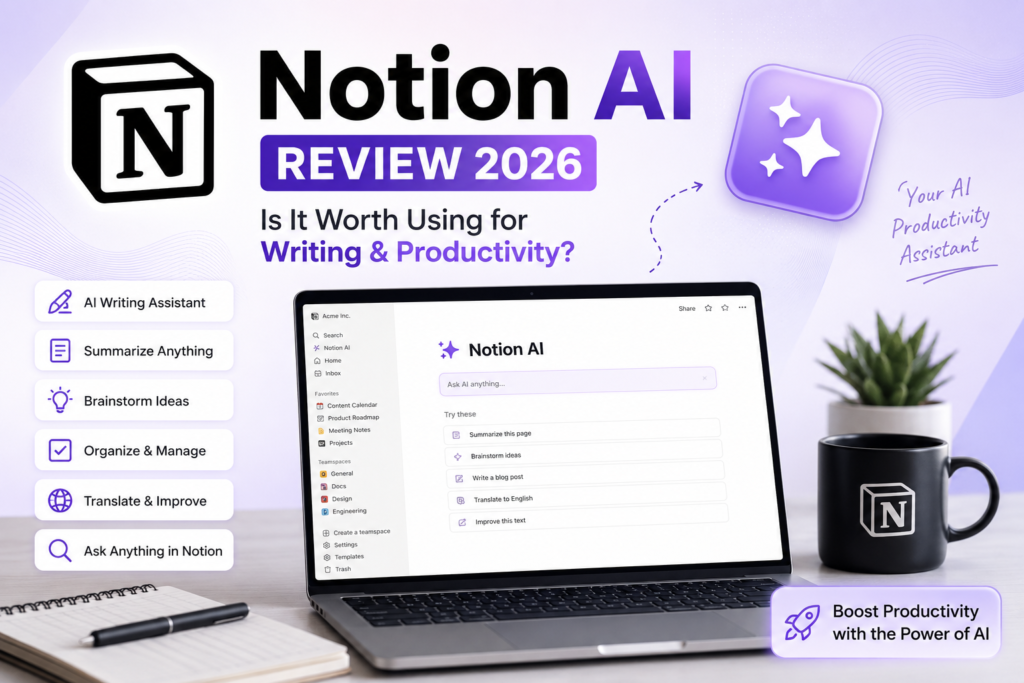
Notion AI is an AI assistant built into the popular workspace Notion. It helps you write notes and documents, summarize content, generate ideas, translate, brainstorm, and improve and summarize your writing. The AI features work directly inside your Notion pages, so you don’t need to go to a separate AI tool. Best for Students, bloggers, content creators, etc.
Key Features of Notion AI
- AI writing assistant (draft, edit, summarize, translate—triggered by /ai or the spacebar on an empty line).
- Question and answer and search across your workspace and connected apps like Slack and Google Drive.
- AI Meeting Notes (captures, transcribes, and summarizes meetings with auto-generated action items).
- AI Database Properties (auto-fills tags, summaries, and translations inside database fields).
- Autonomous AI agents that can run multi-step workflows across hundreds of pages.
- Access to multiple AI models, including GPT-4 and Claude (model routing is handled automatically).
How does Notion AI work?
The Prompt: Asking Notion AI for Help
This is where you see how good an AI feature really is. I didn’t use any complex “prompt”; I simply opened Notion AI and typed a straightforward, natural language request:
Can you help me create a page that helps me track my tech inventory? I have a lot of gadgets that I want to track, including the name of the gear, date acquired, price paid for it, where it’s at, receipt attachment, and payment method that links to my credit card HQ page. These are things like laptops, phones, smart watches, rings, etc.
I just said what I wanted, why I wanted it, and how I planned to use one of the fields to link to my Credit Card HQ Notion page.
The Result: A Perfect Database in Seconds
Here is exactly what Notion AI came back with:
All set! I created a tech inventory database with the fields you asked for: Item Date Acquired Price Paid Location Receipt Credit Card HQ
How to use it quickly Add an item: Click “New” and fill in the fields. Date Acquired: Pick a date or date-time. Price Paid: Enter the amount. Location: Use the place picker to store where it lives. Receipt: Upload your receipt file or photo. Credit Card HQ: Paste the link to your credit card HQ page. Would you like me to: Convert “Credit Card HQ” into a relation to a specific page instead of a URL? If so, share the page link and I’ll wire it up. Add helpful fields like category, condition, serial number, warranty expiration, and notes? Create extra views like “By Category,” “Warranty ending soon,” or a gallery view for visual browsing.
Note that last bit. It didn’t just create a simple “URL” field. It understood what I meant by “links to my credit card HQ page” and offered to turn it into a relation—a core Notion feature. It also anticipated my other needs, like serial number and warranty expiration.
So not only did Notion do the thing I asked, but it incorporated the unique features that make Notion powerful (like relationships) into its response.
That is genuinely useful.
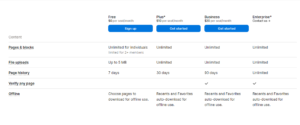
Notion pricing comparison
There’s power in a single platform where you can do all your work. Notion is that single place. The plan was made when I explored the Notion AI. So, this is a Notion AI review.
For Content Creators
For Sharing and Collaborations
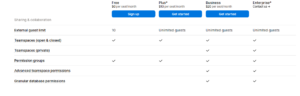
For Notion AI
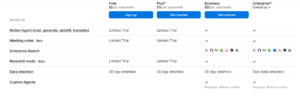
Notion AI vs ChatGPT
Choosing between Notion AI and ChatGPT depends entirely on whether you need a dedicated productivity system or a broad-spectrum problem solver.
Side-by-Side Comparison
| Feature |
Notion AI |
|
| Primary Intent | Workspace optimization and documentation | Interactive conversation and complex reasoning |
| Contextual Source | Your internal pages, wikis, and databases | Broad internet data and user-uploaded files |
| Best For | Organizing notes, summarizing, and writing copy | Brainstorming, coding, and in-depth research |
| Interface Style | Inline text editor blocks | Continuous chat thread history |
| External Integrations | Limited primarily to the Notion ecosystem | Expansive via custom GPTs and API webhooks |
My Experience
After using Notion AI for several tasks, I prepared the Notion AI Review. I found it especially helpful for brainstorming ideas and summarizing long notes. While it isn’t perfect, it integrates smoothly into the Notion workspace and can noticeably improve productivity.
What does Notion AI do?
- ✍️ Write blog posts, emails, and reports
- 📄 Summarize long documents
- 🧠 Brainstorm ideas
- ✅ Create meeting notes and action items
- 🌍 Translate content into multiple languages
- 📋 Generate tables, checklists, and outlines
- 📚 Answer questions from your own Notion workspace
- ✨ Improve grammar, tone, and clarity
Who Should Use Notion AI?
- Students
- Bloggers
- Content Writers
- Freelancers
- Project Managers
- Business Teams
Pros
- Easy to use
- Built directly into Notion
- Excellent for note-taking and productivity
- Saves time on writing and summarizing
- Good collaboration features
Cons
- Requires a Notion account
- AI responses may need fact-checking
- Some advanced AI features require a paid plan
FAQs of Notion Review
1. Is Notion AI free?
No, Notion AI operates on a limited trial system for free and Plus accounts, after which you must upgrade to a paid tier.
2. Can workspace guests use the AI features?
No, guests can only view or edit shared pages but cannot run any AI prompts or access the chat agent.
3. Does Notion work offline?
No, core AI features, including generating automated meeting transcripts and workspace search, require an active internet connection.
4. How much does Notion cost in 2026?
Notion pricing (annual billing): Free ($0, solo use with 20 lifetime AI responses); Plus ($10/user/month, unlimited blocks but only 20 lifetime AI responses); Business ($20/user/month, unlimited AI + custom agents beta); Enterprise (custom). The standalone AI add-on was discontinued in May 2025.
5. Does Notion train its AI models on my data?
No, Notion’s contractual agreements with its third-party model providers explicitly prohibit using your customer data to train AI models.
6. Can the AI search or see private pages?
Notion AI strictly honors your existing workspace permissions, meaning it can only find and use data from pages you already have access to see.
7. How long is my data retained by the AI?
For Free, Plus, and Business tiers, data can be held by AI sub-processors for up to 30 days. Enterprise-tier workspaces use zero-retention APIs where data is deleted immediately after the prompt is fulfilled.
Final Thoughts: Notion AI Review
Look, I started out ignoring Notion AI because I was overwhelmed by the hype. I’m happy to say Notion proved me wrong.
Coming at it with a real-world, practical Notion AI use case—tracking my expensive tech for warranties—showed me its true value. It’s a clear “AI win”: it worked the first time, it’s deeply integrated with core Notion features, and it continues to be useful long after the initial “wow” moment.
If you already use Notion every day, adding Notion AI can significantly improve your productivity. However, if you only need a standalone AI chatbot, tools like ChatGPT or Claude may offer better value.
After testing Notion AI, I found it especially useful for organizing notes, creating content, and managing projects. It’s not designed to replace ChatGPT, but if you already use Notion every day, its AI features can save a significant amount of time.
This is a Notion AI review in 2026. I prepared more AI reviews, like Canva AI Review and Gamma AI Review. For more details, please visit our AI Tools, Software Deals, and WP Themes.